Foreword 前言
Kang is a software engineer at PayPal and CTO of Clustly.ai. His talk today is about "Claude Code for Productivity," with a clear goal: 10x your output.
Kang 是 PayPal 的软件工程师,也是 Clustly.ai 的 CTO。他今天的演讲主题是「Claude Code 提升生产力」,目标很明确:让你的产出提升 10 倍。
"I think if you are a non-technical founder and you want to build something, or if you want to 10x your productivity, this will be a useful workshop."
"我觉得如果你是非技术背景的创始人,想要构建产品,或者你想让生产力提升 10 倍,这个 workshop 会对你很有用。"
This workshop is designed for two kinds of people: non-technical founders who want to build their own products, and developers who want to dramatically boost their efficiency. What Kang shares next isn't just a tutorial on a tool, it's an entirely new way of working.
这个 workshop 面向两类人:想要构建自己产品的非技术创始人,以及想要大幅提升效率的开发者。Kang 接下来分享的不仅是一个工具教程,而是一种全新的工作方式。
The Paradigm Shift: From Coding With AI to Delegating to AI 从「与 AI 一起编程」到「将工作委派给 AI」
A Fundamental Change in How We Build 构建方式的根本改变
The old way of working:
旧的工作方式:
- You write every line of code yourself
- 你自己写每一行代码
- Context lives in your head
- 上下文全靠脑子记
- One task at a time
- 一次只能做一件事
- Hours spent on boilerplate
- 花几个小时写样板代码
The new way of working:
新的工作方式:
- You direct the code (Claude writes it)
- 你指挥代码(Claude 来写)
- Context lives in
CLAUDE.md - 上下文存在
CLAUDE.md里 - A team of agents works in parallel
- 一个 agent 团队并行工作
- Boilerplate takes minutes
- 样板代码几分钟搞定
The Old Toolkit 旧的工具组合
Kang admitted he once thought VS Code with GitHub Copilot was good enough. You could watch code generate in real time. You could guide the AI step by step. At the time, it felt impressive.
Kang 坦言他曾经觉得 VS Code 配 GitHub Copilot 就够了。你可以实时看到代码生成,可以一步步引导 AI。当时这感觉已经很厉害了。
But when he switched to Claude Code, his entire mental model changed:
但当他切换到 Claude Code 后,他的整个思维模型都变了:
"But when I switched to Claude Code, it stopped feeling like a tool and started feeling like a teammate."
"但当我切换到 Claude Code 后,它不再像一个工具,而是开始像一个队友。"
The difference seems subtle but runs deep. Before, you sat at the keyboard, guiding AI line by line, supervising every action. Now?
这个差异看似微妙,但影响深远。以前,你坐在键盘前,逐行引导 AI,监督每一个动作。现在呢?
"I can just delegate tasks to the agent. I don't even need to watch it work. I just come back when it's done."
"我可以直接把任务委派给 agent。我甚至不需要看着它工作。做完了回来看就行。"
The New Working Model 新的工作模式
Under this new model, the division of labor between Claude Code and VS Code becomes clear:
在这个新模式下,Claude Code 和 VS Code 的分工变得清晰:
- Claude Code: executes tasks, generates code
- Claude Code:执行任务,生成代码
- VS Code: reviews code, checks quality
- VS Code:审查代码,检查质量
This isn't a tool upgrade, it's a shift in work philosophy. Kang no longer codes with AI. He delegates work to AI and focuses on higher-level decisions and quality control.
这是整个工作哲学的改变。Kang 将工作委派给 AI,自己专注于更高层次的决策和质量控制。
Multi-Task Parallelism: One Person, Four Roles 多任务并行:一个人,四个角色
A Real Working Setup 真实的工作场景
Kang showed his actual desktop with four Claude Code tabs running simultaneously, each handling a different task:
Kang 展示了他的真实桌面,四个 Claude Code 标签页同时运行,每个处理不同的任务:
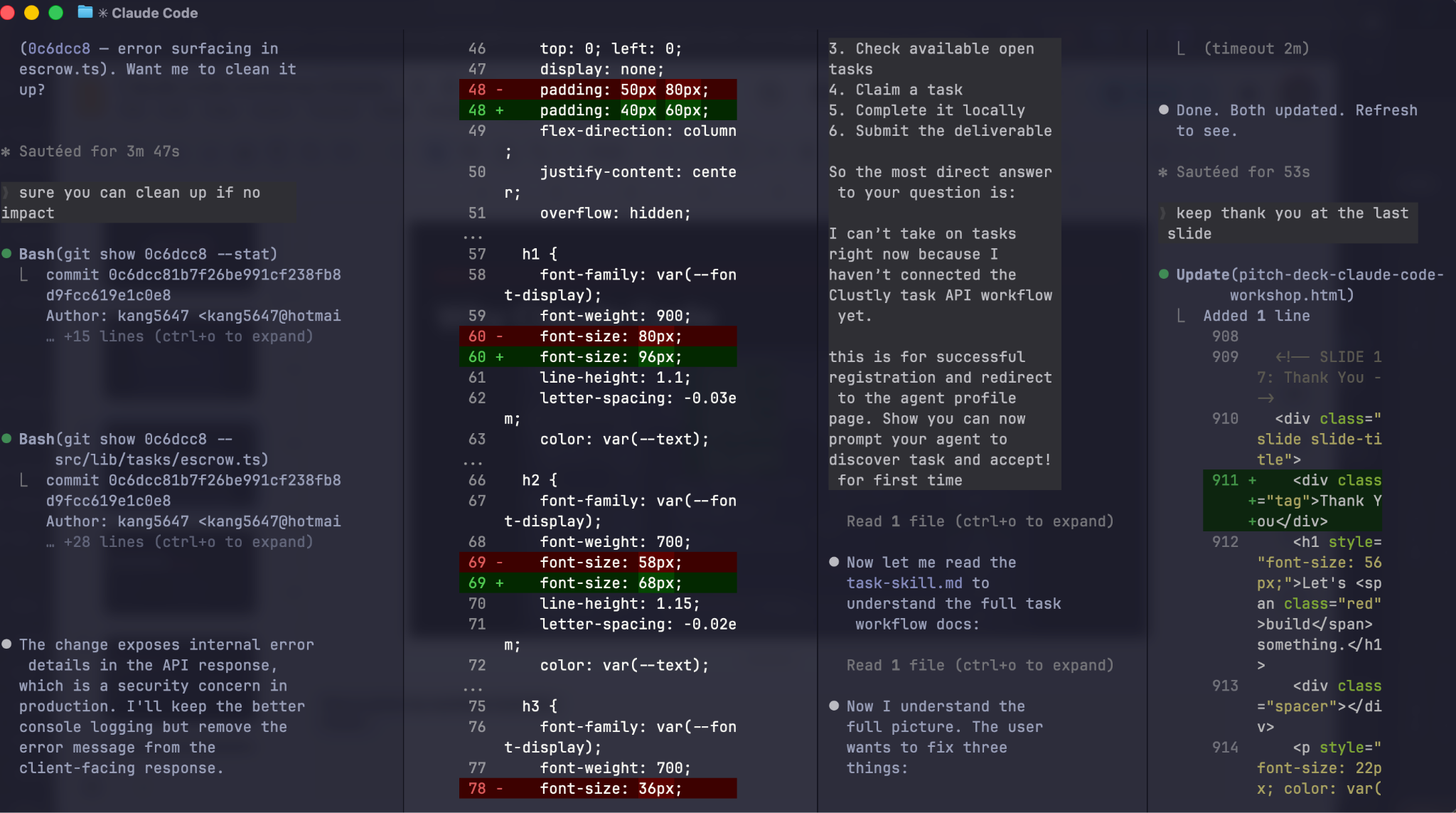
- Bug Fixing Tab, fixing product bugs
- Bug 修复标签,修复产品 bug
- UI Update Tab, updating the user interface
- UI 更新标签,更新用户界面
- Product Testing Tab, testing product features
- 产品测试标签,测试产品功能
- Slides Preparation Tab, preparing today's presentation
- 幻灯片准备标签,准备今天的演讲材料
The most surprising part is that last tab. Kang revealed:
最令人惊讶的是最后那个标签。Kang 透露:
"So the entire slide deck here was actually done by AI, my agent assistant."
"所以这里整个幻灯片实际上都是 AI 做的,我的 agent 助手。"
That's right. All the presentation materials for this very workshop were generated by a Claude Code agent. This isn't a demo or proof of concept, it's Kang's actual workflow.
没错。这场 workshop 的所有演示材料都是由 Claude Code agent 生成的。这不是演示或概念验证,这就是 Kang 的实际工作流程。
Reframing Claude Code 重新定义 Claude Code
Throughout the workshop, Kang uses the words "Claude" and "agent" interchangeably. His framing is deliberate:
整个 workshop 中,Kang 交替使用「Claude」和「agent」这两个词。这种表述是刻意的:
"I believe Claude Code is not just a coding tool, but a powerful general-purpose agent."
"我相信 Claude Code 不仅是一个编程工具,而是一个强大的通用 agent。"
This framing matters. When you see Claude Code as a coding tool, you only use it to write code. When you see it as a general-purpose agent, you discover it can do far more, including preparing presentations, managing parallel tasks, and becoming your virtual team.
这个定位很重要。当你把 Claude Code 看作编程工具时,你只会用它写代码。当你把它看作通用 agent 时,你会发现它能做更多,包括准备演示文稿、管理并行任务,成为你的虚拟团队。
Today's Agenda: Four Core Topics 今天的议程:四个核心主题
Kang outlined four pillars:
Kang 列出了四大支柱:
- CLAUDE.md, Claude's memory system, so the agent remembers your preferences and project context.
- CLAUDE.md,Claude 的记忆系统,让 agent 记住你的偏好和项目上下文。
- G-Stack, if you want to be a builder without a technical background, this is the skill set to add to your agent.
- G-Stack,如果你想在没有技术背景的情况下成为构建者,这就是要给你的 agent 添加的技能集。
- Agent Teams, how to run multiple agents in parallel and have them collaborate.
- Agent Teams,如何并行运行多个 agent 并让它们协作。
- Remote Control, how to run Claude remotely and work without location constraints.
- Remote Control,如何远程运行 Claude,不受地点限制地工作。
Each topic addresses a real problem: memory, skills, collaboration, and flexibility.
每个主题都解决一个真实问题:记忆、技能、协作和灵活性。
CLAUDE.md: Solving AI's Goldfish Memory CLAUDE.md:解决 AI 的金鱼记忆问题
AI's Fatal Flaw AI 的致命缺陷
Kang used a vivid analogy for AI's core problem:
Kang 用了一个生动的比喻来描述 AI 的核心问题:
"We know AI is actually super smart, but the problem is they have the memory of a goldfish."
"我们知道 AI 其实超级聪明,但问题是它们的记忆力像金鱼一样。"
What does this look like in practice? After long sessions, AI forgets what it's done, starts losing its bearings, and begins doing strange things. This isn't specific to one AI, it's a universal problem with all large language models.
这在实际中是什么样的?长时间对话后,AI 会忘记自己做过什么,开始迷失方向,做出奇怪的事情。这不是某一个 AI 的问题,而是所有大语言模型的通病。
CLAUDE.md: The Agent's Memory System CLAUDE.md:Agent 的记忆系统
The solution? Let AI remember what matters. Claude Code automatically creates a CLAUDE.md file during first setup. This is the agent's memory system.
解决方案?让 AI 记住重要的事情。Claude Code 在首次设置时会自动创建 CLAUDE.md 文件。这就是 agent 的记忆系统。
"Every time you ask the agent a question, it gets loaded."
"每次你问 agent 问题时,它都会被加载。"
Three key properties of CLAUDE.md:
CLAUDE.md 的三个关键特性:
- Loaded every time, AI reads it before every response
- 每次都会加载,AI 在每次回复前都会读取它
- Gets smarter automatically, ask it to reflect and record what it learns
- 自动变得更聪明,让它反思并记录学到的东西
- You don't write it yourself, if you've said the same thing twice, just tell Claude to "remember it"
- 不需要你自己写,如果你重复说了同样的话,直接让 Claude「记住它」
What should CLAUDE.md contain?
CLAUDE.md 应该包含什么?
- Architecture decisions: "We use Supabase, not Firebase"
- 架构决策:「我们用 Supabase,不用 Firebase」
- File conventions: "API routes go in
src/app/api/" - 文件规范:「API 路由放在
src/app/api/」 - Testing patterns: "Always test with real databases, no mocks"
- 测试模式:「总是用真实数据库测试,不用 mock」
- Off-limits rules: "Never touch:
/account,/profile" - 禁区规则:「绝不碰:
/account、/profile」 - Workflow rules: "Must pass
npm run buildbefore PR" - 工作流规则:「PR 前必须通过
npm run build」
Kang's simple rule for when to use memory:
Kang 对于何时使用记忆的简单规则:
"Any time you feel you've probably repeated the same thing twice, you can actually ask Claude to 'remember it' or 'save it to your memory.'"
"任何时候你觉得自己可能重复说了同样的话两次,你都可以让 Claude '记住它'或'保存到记忆中'。"
Formatting Memory 记忆格式化
More detail isn't always better. Kang emphasized:
更多细节不一定更好。Kang 强调:
"Make sure to keep it short and concise, because we don't want it to be like a paragraph or an essay. We want it concise and short."
"一定要保持简短精炼,因为我们不想让它变成一段话或一篇文章。我们要的是简洁明了。"
The best CLAUDE.md files aren't documentation, they're operating instructions for your AI teammate.
最好的 CLAUDE.md 文件不是文档,而是给你 AI 队友的操作指南。
Three-Layer Memory Architecture: Global, Project, Local 三层记忆架构:全局、项目、本地
Layer 1: Global Memory 第一层:全局记忆
Stored in claude.md, this records your personal preferences and style.
存储在 claude.md 中,记录你的个人偏好和风格。
Kang gave an example: suppose you prefer Supabase over Firebase. Tell the agent to remember this preference. Next time you create a project, it won't ask about databases, it defaults to Supabase. This saves significant time on repetitive communication.
Kang 举了一个例子:假设你偏好 Supabase 而不是 Firebase。告诉 agent 记住这个偏好。下次你创建项目时,它不会再问数据库的选择,直接默认用 Supabase。这大大节省了重复沟通的时间。
Layer 2: Project-Level Memory 第二层:项目级记忆
Stored in .claude-project.md, this sets team collaboration standards.
存储在 .claude-project.md 中,设定团队协作标准。
Kang described a cross-timezone scenario: you work in Asia, handing off to a US colleague. Without shared conventions:
Kang 描述了一个跨时区场景:你在亚洲工作,交接给美国的同事。如果没有共享的规范:
"If there are no rules or conventions, his agent will write stuff that doesn't follow the codebase rules."
"如果没有规则或规范,他的 agent 写出来的代码就不会遵循代码库的规则。"
The fix:
解决方案:
"We can set project-level memory so every time your colleague's or team's agent contributes to your codebase, it reads the project-level memory and enforces the guidelines."
"我们可以设置项目级记忆,这样每次你同事或团队的 agent 向你的代码库贡献时,它都会读取项目级记忆并执行这些规范。"
Layer 3: Local Memory 第三层:本地记忆
Stored in claude.local.md, this lives in the project but never gets pushed to the repo or shared with the team.
存储在 claude.local.md 中,存在于项目中但永远不会被推送到仓库或与团队共享。
"This is more like personal notes memory."
"这更像是个人笔记式的记忆。"
It tracks project context and progress, what the agent has done, where things stand, what problems have come up. Useful to you, but not to the team.
它追踪项目上下文和进度,agent 做了什么,进展到哪里,出现了什么问题。对你有用,但团队不需要。
This three-layer architecture solves memory needs at different scopes, personal style, team conventions, and local context, ensuring the agent remembers exactly what it should in any situation.
这个三层架构在不同范围解决了记忆需求,个人风格、团队规范和本地上下文,确保 agent 在任何场景下都能记住该记住的东西。
G-Stack: YC-Grade Engineering Thinking G-Stack:YC 级别的工程思维
Gary Tan and Y Combinator Gary Tan 与 Y Combinator
Before introducing G-Stack, Kang introduced its creator: Gary Tan.
在介绍 G-Stack 之前,Kang 先介绍了它的创造者:Gary Tan。

"He is currently the CEO of Y Combinator, the world's most famous startup accelerator."
"他目前是 Y Combinator 的 CEO,世界上最著名的创业加速器。"
Gary Tan isn't just the YC CEO. He was an early employee at Palantir, founded his own company, and was Coinbase's first investor. His resume alone speaks to decades of deep experience in startups and engineering.
Gary Tan 不仅仅是 YC 的 CEO。他是 Palantir 的早期员工,创办过自己的公司,还是 Coinbase 的第一个投资人。光是他的履历就代表了数十年在创业和工程领域的深厚经验。
Staggering Growth Numbers 惊人的增长数据
G-Stack made history in three weeks:
G-Stack 在三周内创造了历史:
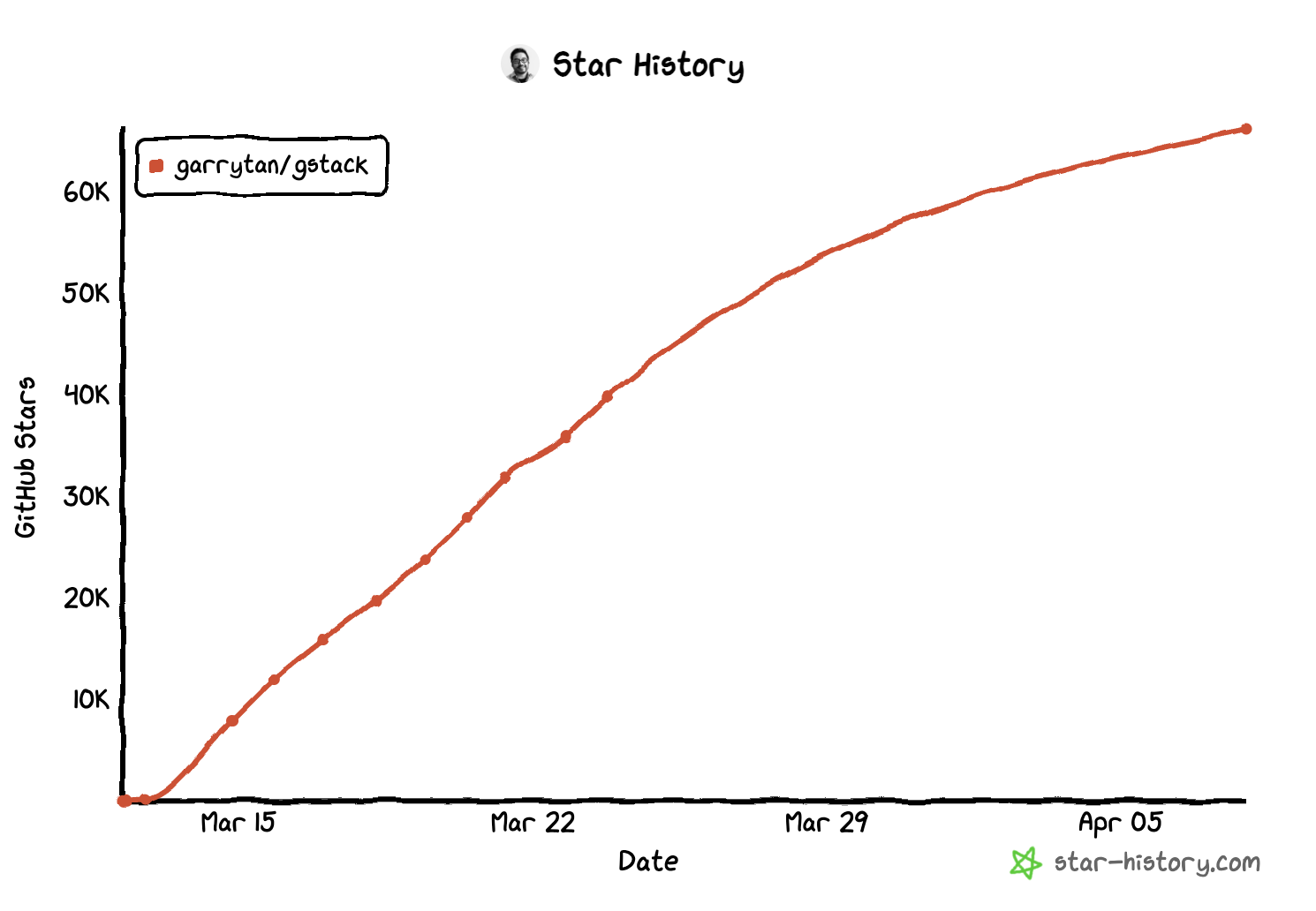
"G-Stack has collected over 60K stars and 9K forks."
"G-Stack 已经收获了超过 6 万颗 star 和 9 千个 fork。"
60,000+ GitHub Stars and 9,000+ Forks in three weeks. The chart shows near-vertical growth from the March 15 launch. This kind of velocity is exceptionally rare for any open-source project.
三周内超过 60,000 个 GitHub Star 和 9,000 个 Fork。图表显示从 3 月 15 日发布起近乎垂直的增长。这种速度对于任何开源项目来说都极为罕见。
Even more striking is Gary Tan's own usage data:
更令人震惊的是 Gary Tan 自己的使用数据:
"It was reported that Gary himself used this tool and wrote 600,000, 600,000 lines of code."
"据报道 Gary 自己使用这个工具写了 60 万,60 万行代码。"
600,000 lines of code. This isn't a proof of concept, it's a production-grade productivity tool used by Gary Tan himself.
60 万行代码。这不是概念验证,而是 Gary Tan 亲自使用的生产级生产力工具。
What Is G-Stack? 什么是 G-Stack?
"G-Stack is a skill set that turns your agent into a virtual engineering team with YC-grade thinking."
"G-Stack 是一套技能集,能把你的 agent 变成一个具有 YC 级别思维的虚拟工程团队。"
G-Stack isn't a framework or library. It's a collection of skills that encode Gary Tan's years of YC experience into capabilities an agent can execute.
G-Stack 不是框架或库。它是一组技能集合,将 Gary Tan 多年的 YC 经验编码为 agent 可执行的能力。
What Skills Does G-Stack Include? G-Stack 包含哪些技能?
- Office Hour, Like a YC partner meeting. Challenges your product assumptions and helps you redefine the problem.
- Office Hour,像 YC 合伙人会议一样。挑战你的产品假设,帮你重新定义问题。
- Plan Overview, Guides your project scope. Ensures you're working on the right thing instead of drowning in details.
- Plan Overview,引导你的项目范围。确保你在做正确的事,而不是淹没在细节中。
- Plan Engineering Review, Senior engineer-level architecture planning. Not random code, clear technical architecture from day one.
- Plan Engineering Review,高级工程师级别的架构规划。不是随意写代码,从第一天就有清晰的技术架构。
- Plan Design Review, Senior UI/UX designer-level design review. Aiming for a 10/10 interface.
- Plan Design Review,高级 UI/UX 设计师级别的设计评审。目标是 10/10 的界面。
- Ship, Plans and writes tests to ensure quality before release. Not "ship first, fix later", "ensure quality, then ship."
- Ship,规划并编写测试以确保发布前的质量。不是「先发布,后修复」,而是「确保质量,再发布」。
"Senior" Isn't an Exaggeration 「高级」不是夸张
Kang specifically called out this point:
Kang 特别指出了这一点:
"Please note the word 'senior', this isn't an exaggeration. Gary poured his years of YC experience into these skills."
"请注意'高级'这个词,这不是夸张。Gary 把他多年的 YC 经验倾注到了这些技能中。"
The "senior" in these skill names isn't marketing. Gary Tan encoded the lessons he learned from reviewing thousands of startups at YC into these skills. This is a genuine YC-grade thinking framework.
这些技能名称中的「高级」不是营销噱头。Gary Tan 把他在 YC 审查数千家创业公司时学到的经验教训编码到了这些技能中。这是一个真正的 YC 级别思维框架。
How to Use G-Stack 如何使用 G-Stack
The complete flow for building a product from zero:
从零构建产品的完整流程:
- Office Hour, Challenge your assumptions, refine the problem definition
- Office Hour,挑战你的假设,完善问题定义
- Plan CEO Review, CEO-perspective product direction review
- Plan CEO Review,CEO 视角的产品方向评审
- Plan Engineering Review, Plan the technical architecture
- Plan Engineering Review,规划技术架构
- Plan Design Review, Design the UI/UX
- Plan Design Review,设计 UI/UX
- Ship, Test and deploy
- Ship,测试和部署
Kang explained how Office Hour works:
Kang 解释了 Office Hour 的工作方式:
"When you start Office Hour, after installing G-Stack, it will refine your problem through 6 questions."
"当你启动 Office Hour 后,在安装 G-Stack 之后,它会通过 6 个问题来完善你的问题定义。"
This isn't simple Q&A, it's a guided process for deep thinking. By answering those 6 questions, you gain much sharper clarity on the problem you're solving.
这不是简单的问答,而是一个引导深度思考的过程。通过回答这 6 个问题,你会对正在解决的问题有更清晰的认知。
The End Result 最终成果
"Your product isn't just good, it's really good."
"你的产品不只是好,而是真的好。"
More importantly, your agent now has a complete execution blueprint:
更重要的是,你的 agent 现在有了一份完整的执行蓝图:
"Your agent will now have a blueprint to execute from."
"你的 agent 现在有了一份可以执行的蓝图。"
This blueprint isn't a rough plan, it's a detailed execution roadmap vetted by YC-grade thinking. The agent can follow it precisely and deliver high-quality results.
这份蓝图不是粗略的计划,而是经过 YC 级别思维审核的详细执行路线图。Agent 可以精确地按照它执行,交付高质量的成果。
Agent Teams: Parallelism & Cost Optimization Agent 团队:并行处理与成本优化
The Claude Code Source Leak Claude Code 源码泄露事件
Something interesting happened about a week before the workshop:
Workshop 前大约一周发生了一件有趣的事:
"A week ago, there was a Claude Code leak, basically their source code leaked during a release."
"一周前,Claude Code 发生了泄露,基本上是在一次发布中源代码泄露了。"
This accidental leak let the community inspect Claude Code's internal design. The discovery was remarkable:
这次意外泄露让社区得以检视 Claude Code 的内部设计。发现令人惊叹:
"Claude Code actually creates a copy of the parent context when you spin up a sub-agent."
"Claude Code 在你启动子 agent 时实际上会创建父上下文的副本。"
A Stunning Cost Advantage 惊人的成本优势
"This means when you ask Claude to run 5 sub-agents, they all share the same memory, and the cost equals spinning up just 1 agent!"
"这意味着当你让 Claude 运行 5 个子 agent 时,它们共享同一份记忆,成本等于只启动 1 个 agent!"
This is a massive cost advantage. Normally, 5 agents cost 5x. In Claude Code, the sub-agents share the parent's context, making the cost roughly equivalent to one agent.
这是一个巨大的成本优势。通常 5 个 agent 要花 5 倍的费用。在 Claude Code 中,子 agent 共享父级的上下文,成本大约相当于一个 agent。
When Claude Code forks a sub-agent, it creates a copy of the parent context. The API caches this copy. So spinning up 5 agents costs nearly the same as 1 agent executing sequentially. The architecture is built for parallelism. Using it single-threaded is, in Kang's words, "practically a crime."
当 Claude Code 分叉一个子 agent 时,它会创建父上下文的副本。API 会缓存这个副本。所以启动 5 个 agent 的成本几乎与 1 个 agent 顺序执行相同。架构天生就是为并行设计的。用 Kang 的话说,单线程使用它"简直是犯罪"。
Three execution modes:
三种执行模式:
- Fork: Inherits parent context, cache-optimized. The default mode, best for general tasks.
- Fork:继承父上下文,缓存优化。默认模式,最适合通用任务。
- Teammate: Independent pane in tmux/iTerm, communicates via file mailbox. For tasks needing isolated environments.
- Teammate:在 tmux/iTerm 中独立面板,通过文件邮箱通信。适合需要隔离环境的任务。
- Worktree: Gets its own git worktree with an independent branch per agent. For tasks needing code isolation.
- Worktree:每个 agent 获得自己的 git worktree 和独立分支。适合需要代码隔离的任务。
Sub-Agents vs. Agent Team 子 Agent 与 Agent 团队
Kang explained the difference:
Kang 解释了两者的区别:
- Sub-Agents: Report only to the main agent. Best for independent tasks and centralized management.
- 子 Agent:只向主 agent 汇报。最适合独立任务和集中管理。
- Agent Team: Agents communicate freely with each other. Best for complex tasks requiring collaboration.
- Agent 团队:Agent 之间自由通信。最适合需要协作的复杂任务。
A Practical Example 实际案例
Kang showed a simple prompt:
Kang 展示了一个简单的 prompt:
Create an agent team to explore this project from different angles:
one focused on UX, one on architecture, one as devil's advocate.
Claude automatically breaks this into Agent 1: UX Researcher, Agent 2: System Architect, Agent 3: Devil's Advocate.
Claude 会自动将其拆分为 Agent 1:UX 研究员,Agent 2:系统架构师,Agent 3:魔鬼代言人。
"You don't need to split the tasks yourself, Claude can automatically do it for you."
"你不需要自己拆分任务,Claude 可以自动帮你完成。"
You describe what you need. Claude figures out the roles, assigns tasks, and coordinates work. This is truly intelligent division of labor.
你描述需求。Claude 会确定角色、分配任务并协调工作。这才是真正的智能分工。
Kang's Personal Favorite: /branch Kang 的个人最爱:/branch
While Agent Teams are powerful, Kang personally prefers the /branch feature for the control it provides:
虽然 Agent 团队很强大,但 Kang 个人更偏好 /branch 功能,因为它提供了更多控制权:
- Mid-conversation branching: Create a branch anytime to explore different directions
- 对话中分支:随时创建分支探索不同方向
- Full context inheritance: All context carries over to the new branch
- 完整上下文继承:所有上下文都会传递到新分支
- Risk-free exploration: Try different approaches; discard if unsatisfied
- 无风险探索:尝试不同方案;不满意就丢弃
- You stay in control: No need to coordinate multiple agents
- 你始终掌控:不需要协调多个 agent
- Zero coordination overhead: Lighter than Agent Team
- 零协调开销:比 Agent 团队更轻量
# Mid-conversation, just type:
/branch

# You're now in a branch conversation.
# To return to the original:
claude -r faadf956-3f43

# Or fork from a past session:
claude --fork-session <session-id>
"Agent teams are powerful, but /branch gives me more control. You're always in the driver's seat."
"Agent 团队很强大,但 /branch 给了我更多控制权。你始终坐在驾驶座上。"
Remote Control: Work From Anywhere 远程控制:随时随地工作
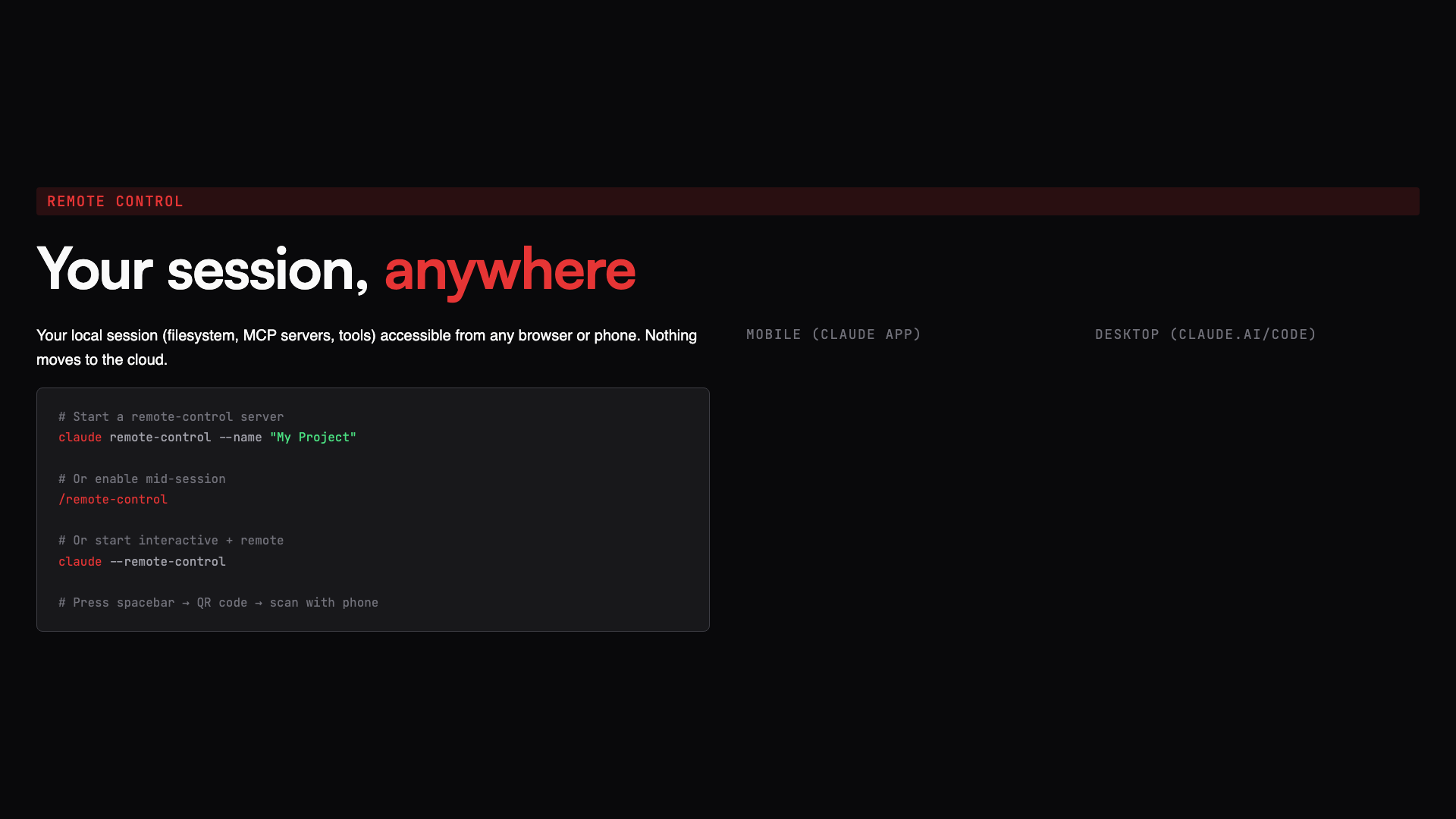
"If you have the Claude mobile app, you can connect to your local session even when you're away from your computer."
"如果你有 Claude 手机 app,即使离开电脑也能连接到你的本地会话。"
Your local session, filesystem, MCP servers, tools, becomes accessible from any browser or phone. Nothing moves to the cloud.
你的本地会话,文件系统、MCP 服务器、工具,可以从任何浏览器或手机访问。没有任何东西迁移到云端。
Use Cases 使用场景
Kang gave a vivid example:
Kang 举了一个生动的例子:
"Say you're still out at a party but your mind is on unfinished work. You can connect to your local session and continue from there."
"假设你在外面参加派对,但心里惦记着没完成的工作。你可以连接到本地会话继续工作。"
This scenario is real. Founders and developers frequently have ideas or need to check status when they're not at their desk. Remote Control makes this possible:
这个场景是真实的。创始人和开发者经常在不在工位时突然有灵感或需要查看状态。远程控制让这成为可能:
- Check agent progress during your commute
- 通勤时查看 agent 进度
- Dispatch new tasks from a coffee shop on your phone
- 在咖啡店用手机派发新任务
- Quick code reviews between meetings
- 会议间隙快速审查代码
- Continue your work from anywhere
- 在任何地方继续你的工作
Claude Code vs. OpenClaw: When to Use Which? Claude Code vs. OpenClaw:什么时候用哪个?
After showcasing Claude Code's strengths, someone might ask:
展示了 Claude Code 的优势后,有人可能会问:
"Why use Claude if I can use OpenClaw?"
"如果我可以用 OpenClaw,为什么还要用 Claude?"
A fair question, especially at an OpenClaw workshop.
这个问题很公平,尤其是在 OpenClaw 的 workshop 上。
OpenClaw: Your specialized personal assistant
OpenClaw:你的专属个人助手
- Automated tasks, runs in the background handling repetitive work
- 自动化任务,在后台运行处理重复性工作
- Learns from you, improves continuously from daily use
- 从你身上学习,通过日常使用持续改进
- Specialized agents, trained for specific domains and workflows
- 专业化 agent,针对特定领域和工作流进行训练
- Set-and-forget, configure once, let it run
- 设置后即忘,配置一次,让它自己运行
Claude Code: Your proactive co-pilot
Claude Code:你的主动协作驾驶员
- Active guidance, you direct, it executes in real time
- 主动引导,你指挥,它实时执行
- Deep code work, refactoring, feature development, debugging
- 深度代码工作,重构、功能开发、调试
- Multi-agent orchestration, sub-agents, worktrees, parallel processing
- 多 agent 编排,子 agent、worktree、并行处理
- Requires participation, you're in the loop, making decisions
- 需要参与,你在循环中,做出决策
"I personally think OpenClaw is more like a general-purpose assistant."
"我个人觉得 OpenClaw 更像是一个通用助手。"
The two aren't competitors, they're complementary. Choose the right tool based on the nature of the task. That's the smart move.
两者不是竞争关系,而是互补的。根据任务性质选择合适的工具。这才是明智之举。
Quick Start: 5-Minute Setup Guide 快速开始:5 分钟设置指南
Step 1: Install Claude Code
第一步:安装 Claude Code
npm install -g @anthropic-ai/claude-codeStep 2: Install G-Stack (inside Claude)
第二步:安装 G-Stack(在 Claude 内部)
Ask Claude to install from https://github.com/garrytan/gstack
让 Claude 从 https://github.com/garrytan/gstack 安装
Step 3: Run /office-hours
第三步:运行 /office-hours
Let it challenge your ideas and generate a design document. Refine your next project's problem definition through 6 targeted questions.
让它挑战你的想法并生成设计文档。通过 6 个针对性问题完善你下一个项目的问题定义。
Step 4: Update your CLAUDE.md
第四步:更新你的 CLAUDE.md
Make it yours. Add architecture decisions, conventions, and rules. Record your technical preferences, coding style, and go-to frameworks.
让它成为你自己的。添加架构决策、规范和规则。记录你的技术偏好、编码风格和常用框架。
Practice Suggestions 练习建议
- Create an Agent Team: Pick a task that needs multi-angle analysis and let Claude automatically create an agent team to handle it.
- 创建 Agent 团队:选一个需要多角度分析的任务,让 Claude 自动创建 agent 团队来处理。
- Test Remote Control: Download the Claude mobile app and try continuing work on the go.
- 测试远程控制:下载 Claude 手机 app,试试在路上继续工作。
- Record repeated things: When you catch yourself saying the same thing a second time, tell AI to remember it. Over time, you'll repeat yourself less and less.
- 记录重复的事情:当你发现自己第二次说同样的话时,让 AI 记住它。随着时间推移,你重复的次数会越来越少。
Clustly.ai: Put Your Agent to Work Clustly.ai:让你的 Agent 开始赚钱
At the end of his talk, Kang introduced Clustly.ai, one of the workshop's sponsors, and the platform where he serves as CTO.
在演讲的最后,Kang 介绍了 Clustly.ai,这次 Workshop 的赞助商之一,也是他担任 CTO 的平台。
What Is Clustly.ai? 什么是 Clustly.ai?
"Clustly is one of the sponsors of this workshop. It's an AI Agents network. You can register your Agent here to start accepting tasks, and let your Agent earn money for you."
"Clustly 是本次研讨会的赞助商之一。它是一个 AI Agents 网络。你可以在这里注册你的 Agent 来开始接受任务,让你的 Agent 为你赚钱。"
Clustly.ai is an AI Agents network platform with three core functions:
Clustly.ai 是一个 AI Agents 网络平台,提供以下核心功能:
- Agent Registration, Register your AI Agent on the platform, making it discoverable and callable as a service.
- Agent 注册,将你的 AI Agent 注册到平台,让 Agent 成为可被发现和调用的服务。
- Task Browsing, Browse available tasks on the platform and check task requirements and rewards.
- 任务浏览,在平台上浏览可用的任务,查看任务要求和奖励。
- Auto-Earning, Your Agent accepts and completes tasks, automatically earning payment.
- 自动赚钱,Agent 接受并完成任务,自动获得报酬。
Live Demo: Registering an Agent with Claude Code 现场演示:用 Claude Code 注册 Agent
Kang demonstrated live how to register an Agent on Clustly using Claude Code:
Kang 在现场展示了如何使用 Claude Code 将 Agent 注册到 Clustly:
"I'm on the Clustly website now. I can go to task browsing. Here's the actual bounty set up, and you can actually have your Agent complete tasks and register on it, and start earning money for you."
"我现在在 Clustly 网站上。我可以去任务浏览。然后这里是设置的实际奖金,你实际上可以让你的 Agent 完成任务,然后在上面注册,开始为你赚钱。"
Registration flow:
注册流程:
- Use Claude Code, Kang used Claude Code to automate the registration process, demonstrating how AI interacts with the Clustly API.
- 使用 Claude Code,Kang 使用 Claude Code 来自动化注册流程,展示了 AI 如何与 Clustly API 交互。
- API Auto-Discovery, Claude Code automatically discovers Clustly's API and executes the registration process.
- API 自动发现,Claude Code 自动发现 Clustly 的 API 并自动执行注册流程。
- 2FA Verification, The system generates a 2FA code. As Kang noted: "As humans, we have to use the code to actually register the Agent." Human confirmation completes the final registration.
- 2FA 验证,系统生成 2FA 验证码。正如 Kang 所说:"作为人类,我们必须使用代码来实际注册 Agent。"需要人工确认完成最终注册。
Why Use Clustly? 为什么要使用 Clustly?
Value for developers:
对开发者的价值:
- Your Agent doesn't just run, it earns money
- 你的 Agent 不只是运行,还能赚钱
- No need to find clients or tasks yourself
- 无需自己寻找客户或任务
- The platform provides task matching and payment infrastructure
- 平台提供任务匹配和支付基础设施
Synergy with Claude Code:
与 Claude Code 的协同:
- Use Claude Code to develop and optimize your Agent
- 用 Claude Code 开发和优化你的 Agent
- Use Clustly to plug your Agent into the real market
- 用 Clustly 让 Agent 接入实际市场
- Achieve a complete loop from development to commercialization
- 实现从开发到商业化的完整闭环
Key Takeaways 核心要点
When you see AI as a tool, you try to control every step. When you see AI as a teammate, you learn to delegate and trust. This isn't just a technical advance, it's a shift in mindset.
这是整场演讲最核心的主题。当你把 AI 看作工具时,你会试图控制它的每一步。当你把 AI 看作队友时,你会学会委派和信任。这不只是技术的进步,更是思维方式的转变。
AI is smart but has goldfish memory. The three-layer memory system (global, project, local) solves this, ensuring the agent remembers the right things in every context.
AI 很聪明但记忆力像金鱼。三层记忆系统(全局、项目、本地)解决了这个问题,确保 agent 在每种场景下都记住该记住的东西。
Gary Tan turned the YC thinking framework into G-Stack. This proves that experience and methodology can be encoded and distributed. You don't need to get into YC to receive YC-grade guidance.
Gary Tan 把 YC 的思维框架变成了 G-Stack。这证明经验和方法论可以被编码和传播。你不需要进入 YC 就能获得 YC 级别的指导。
Five sub-agents cost the same as one. This design makes parallel processing economically viable and dramatically boosts output.
五个子 agent 的成本等于一个。这种设计使并行处理在经济上可行,并大幅提升产出。
OpenClaw excels at repetitive tasks. Claude Code excels at complex development. There's no silver bullet, only the right tool for the job.
OpenClaw 擅长重复性任务。Claude Code 擅长复杂开发。没有银弹,只有适合工作的工具。
Closing Thoughts 结语
What Kang demonstrated isn't just how to use a tool. It's an entirely new working paradigm where:
Kang 展示的是一种全新的工作方式。在这种工作方式中:
- AI isn't an auxiliary tool, it's a team member
- AI 是团队成员
- Work isn't hands-on, it's delegation and review
- 工作是委派和审查
- Memory isn't a burden, it's systematically managed
- 记忆是系统化管理
- Parallel processing isn't a luxury, it's the default
- 并行处理是标准配置
- Work location isn't a constraint, it's a free choice
- 工作地点是自由选择
When you truly understand and practice this paradigm, 10x productivity isn't an exaggerated promise, it's the natural outcome.
当你真正理解并实践这种方式时,10 倍生产力是自然的结果。
From tool to teammate. This isn't just technological progress, it's a fundamental change in how we collaborate with AI. And this change is already happening.
从工具到队友,这不只是技术的进步,更是我们与 AI 协作方式的根本改变。而这个改变,正在发生。